Three days to make an open-ended delivery request understandable before you commit.
Toters: Butler · PRODUCT DESIGN · DESIGN EXERCISE · 2025
What follows is how I approach a real product under a tight clock, and what I’d have done with more time.
Butler lets users request delivery of almost anything that fits on a motorbike, forgotten keys, documents, personal items. The service was flexible. The ordering experience was not: one request was split across several screens, forcing users to change context again and again before they could see the order as a whole.
Properties
- Role
- Product Designer
- Design exercise
- Toters, three-day take-home
- Timeline
- 3 days
- Scope
- Flow analysis, UX strategy, interaction design, mobile prototyping
- Focus
- “Deliver Your Stuff”
If you read nothing else
- The problem: You committed to a Butler order before knowing what it cost or how long it would take, across screens where fixing one detail meant starting over.
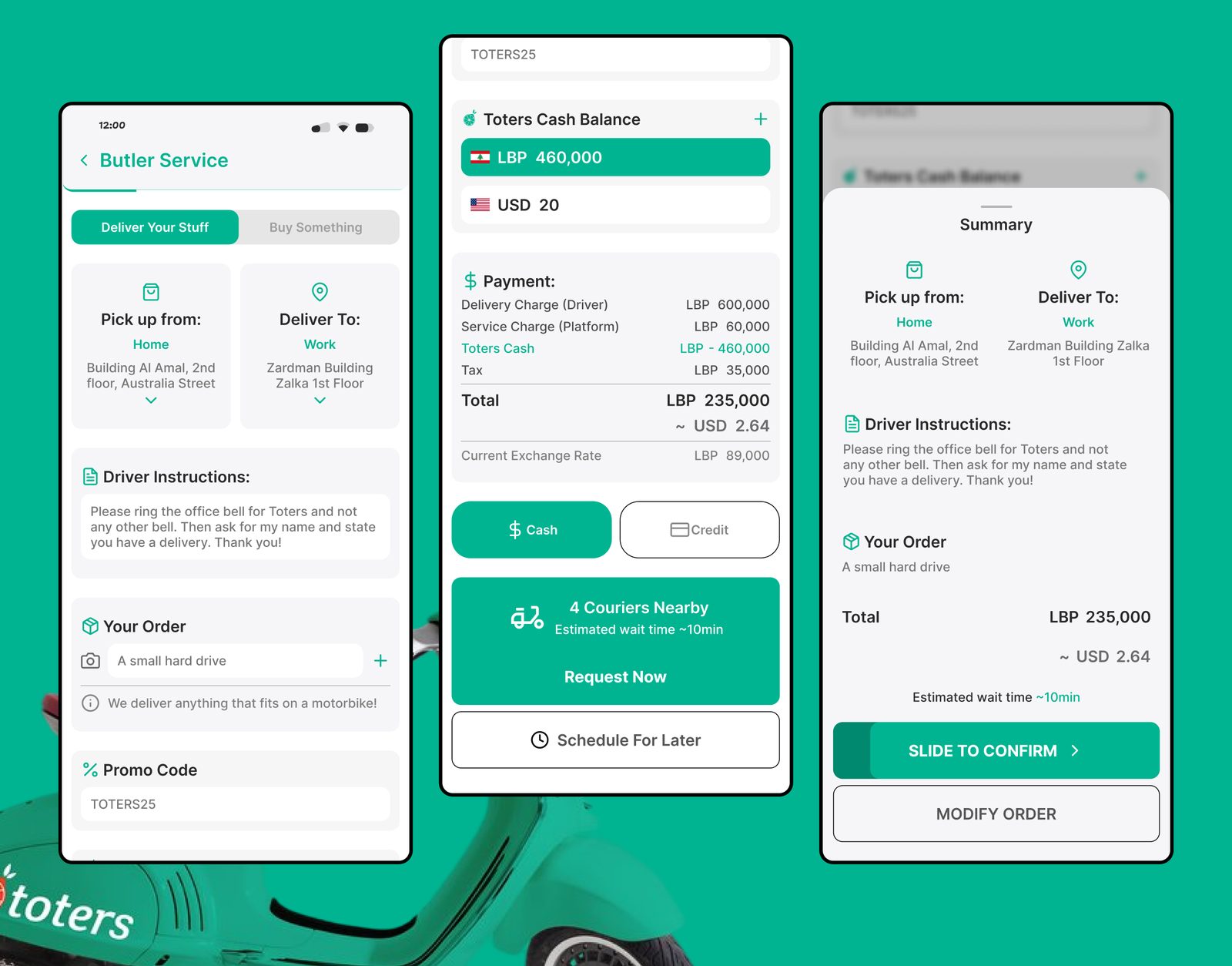
- What I did: A three-day redesign into one continuous, editable page: items, addresses, fees, and couriers in a single view.
- What changed: Cost, wait time, and the whole request are visible before you commit, and every detail can be corrected in place.
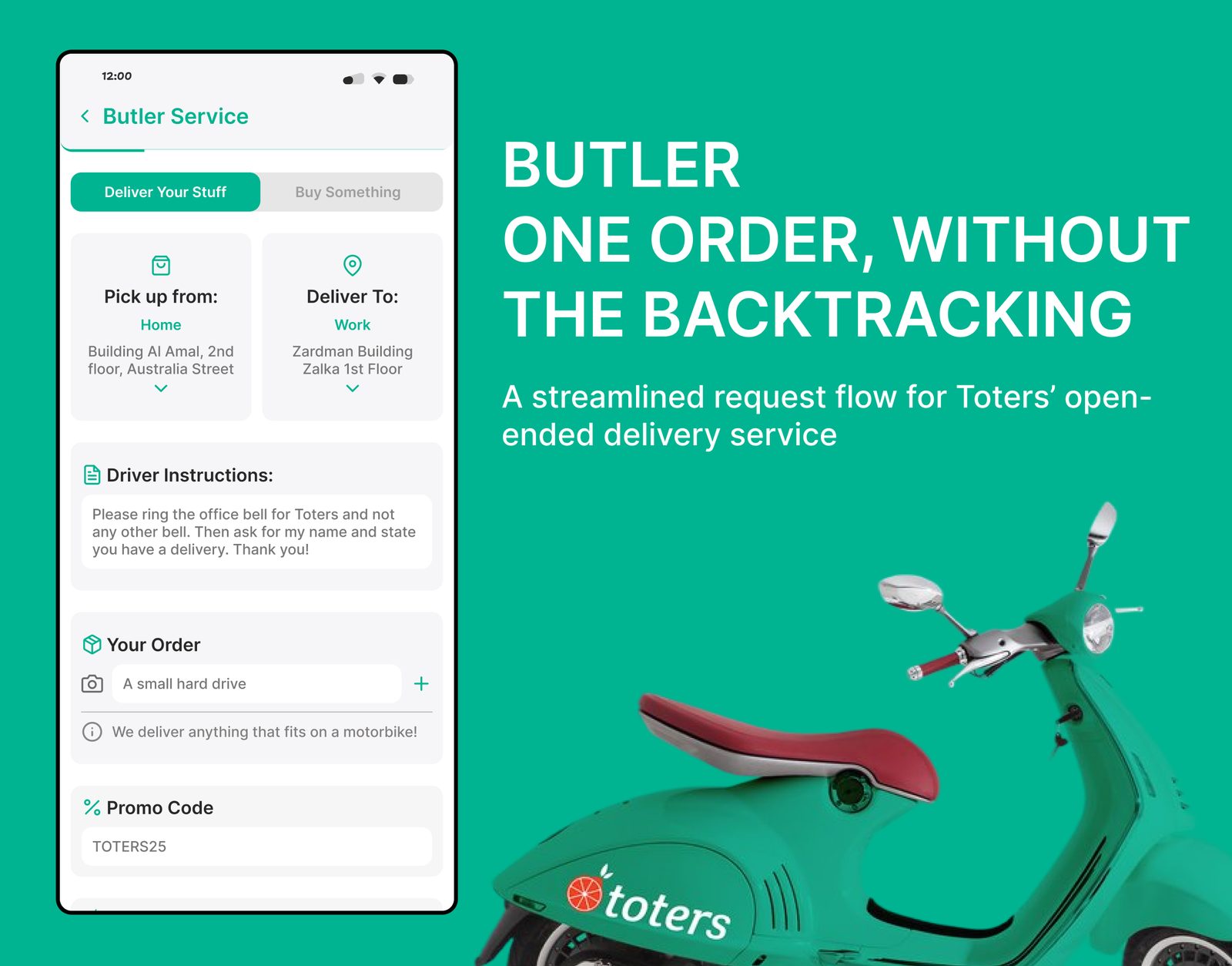
I redesigned the flow as one editable page, addresses, instructions, items, payment, pricing and courier availability in a single continuous experience.
Fewer screens was never the goal. I wanted a request you could understand, correct, and submit in one place.
01, The challenge
Ordering from a restaurant starts from a catalogue. Butler starts from an open-ended request, the user has to explain:
- What needs to be delivered
- Where it should be collected
- Where it should go
- What the courier needs to know
- How the order will be paid for
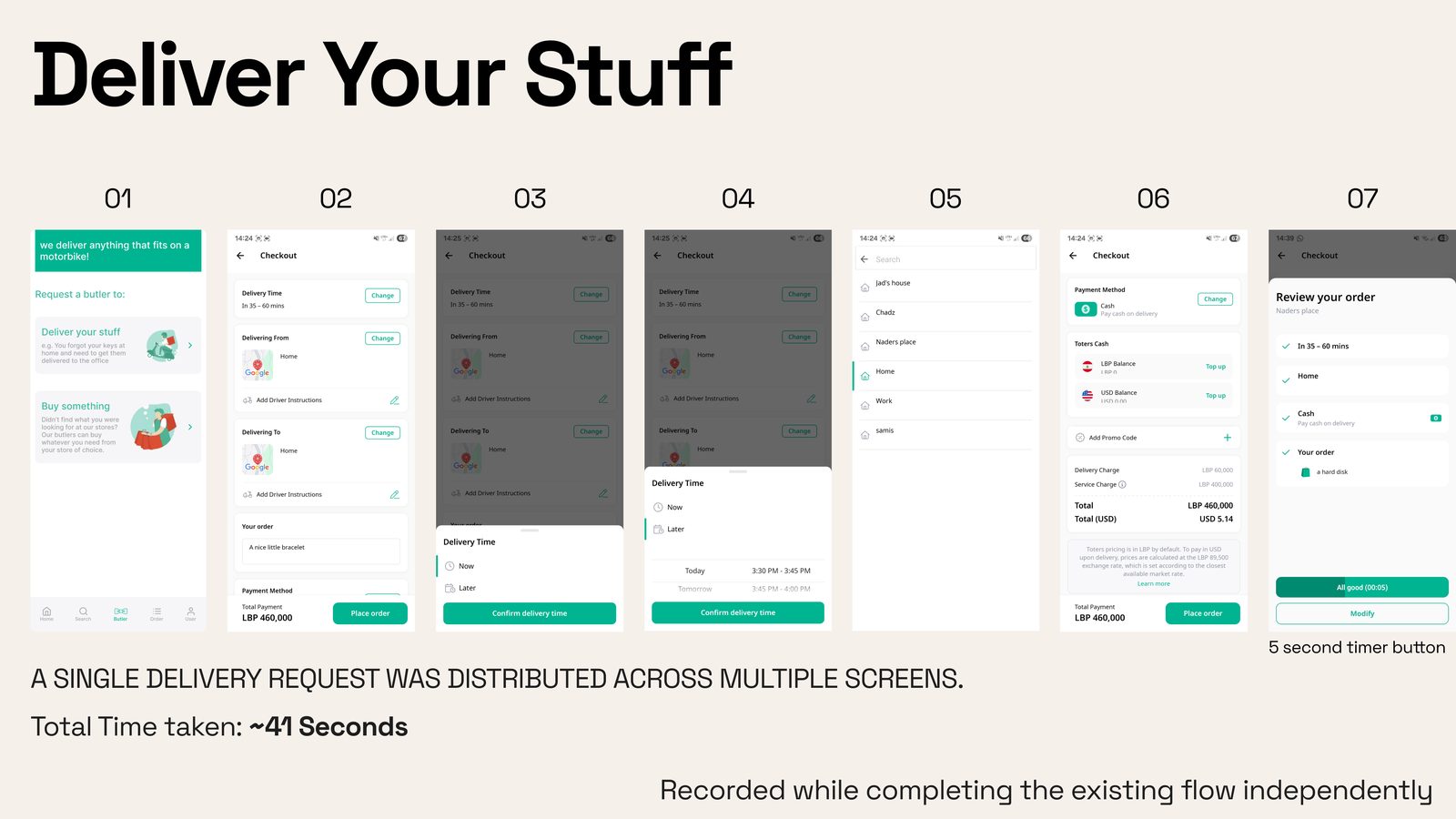
The existing flow collected all of this across a sequence of screens. That structure worked, but it separated information that belonged to the same decision: changing an address meant going back, adding items stretched the flow, and the full price only appeared near the end.
02, How I evaluated the existing flow
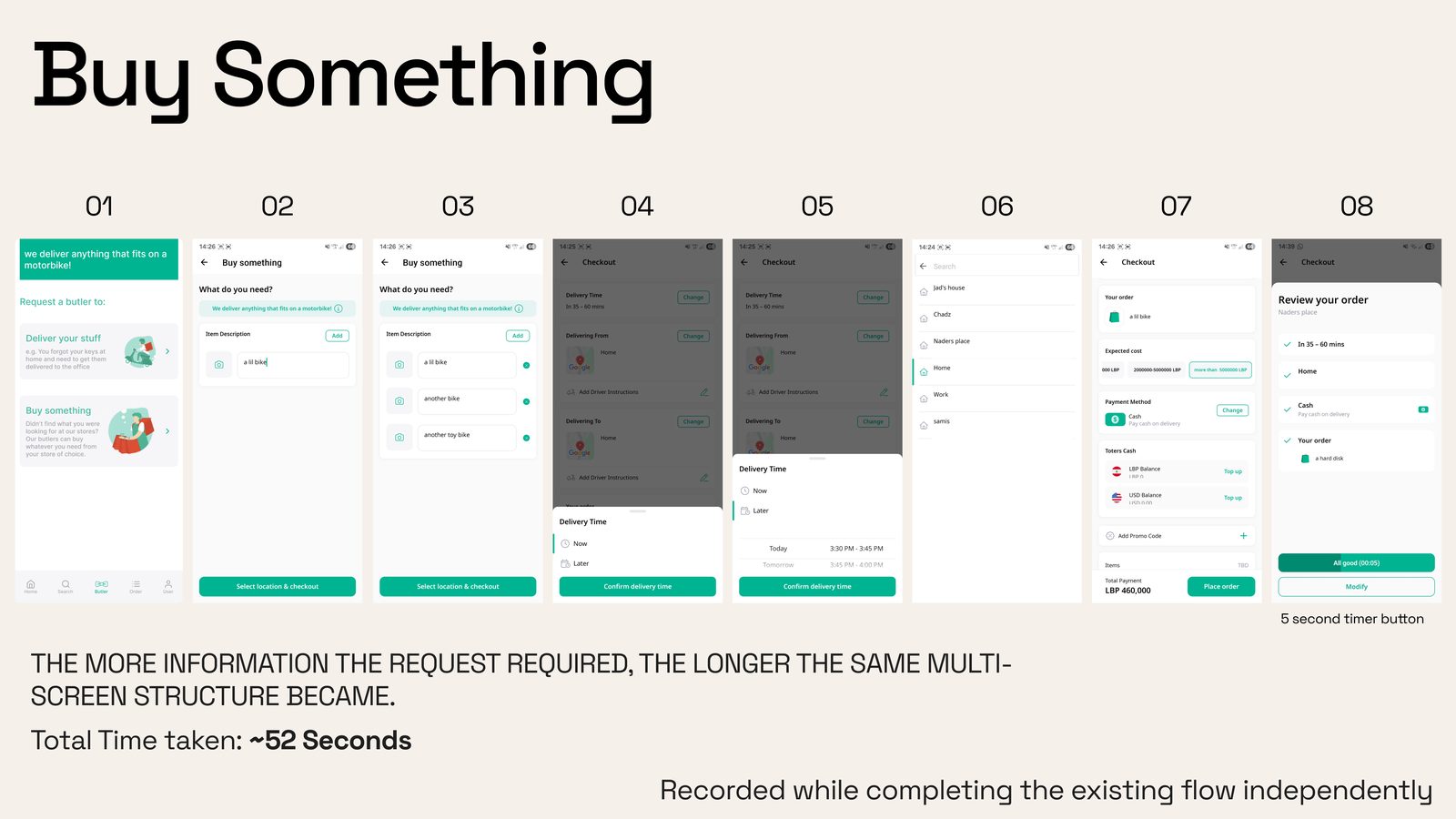
I timed myself walking through both Butler request types end to end, the primary research artifact with three days on the clock.
- ~41s, to place a basic Deliver Your Stuff request in the existing flow
- ~52s, for the Buy Something flow, and growing with every added item or image
The problem wasn’t that a step was unnecessary, Butler genuinely needs detailed information. It was how that information was divided across screens.
What the reviews added
I also pulled the app’s online reviews and had AI compile recurring pros and cons.
What was working
- Anything Delivery is great, “Being able to deliver anything that fits on a moped is amazing”
- Real-time order tracking, “Being able to track them live puts my mind to ease”
- Rewards & saved preferences, “Gaining rewards makes me want to use it again, and having my preferences saved allows me to deliver stuff faster”
Where trust broke
- App stability & performance, “Frequent crashes and bugs”
- Slow loading, buggy GPS tracking, “GPS doesn’t update sometimes and is slow”
- Order reliability, “Long wait time before butler picks up”
- Opaque pricing & high fees, “Pricing not being clear, huge fees”
- Customer support takes too long, “Sometimes takes 20+ minutes until anyone picks up”
Crashes, GPS and support sat outside what an interface can fix. I focused on what the request flow could:
- Ordering effort
- Address visibility
- Backtracking
- Fee transparency
- Courier availability
- Clarity before confirmation
03, Framing the problem
The Butler user is not completing a conventional checkout. They are translating a real-world errand into instructions another person can act on. The redesign had to support four things:
- Keep the whole request visible, Pickup, delivery, items and instructions form one task. They should not feel like unrelated screens.
- Make corrections immediate, Changing an address or order detail should not require reconstructing the journey.
- Surface cost before commitment, Users should understand what they are paying and how the total is structured.
- Reduce uncertainty around the wait, Show whether couriers are nearby before asking the user to submit.
04, The design direction
I consolidated the request into one scrollable page, recognizable sections, order intact, instead of a tighter wizard, the walkthroughs showed the lost seconds were in the transitions, not the fields.
- Service type
- Pickup and delivery addresses
- Driver instructions
- Order items
- Promo code
- Toters Cash and payment
- Fee breakdown
- Courier availability
- Final review
1. Keeping the route in view
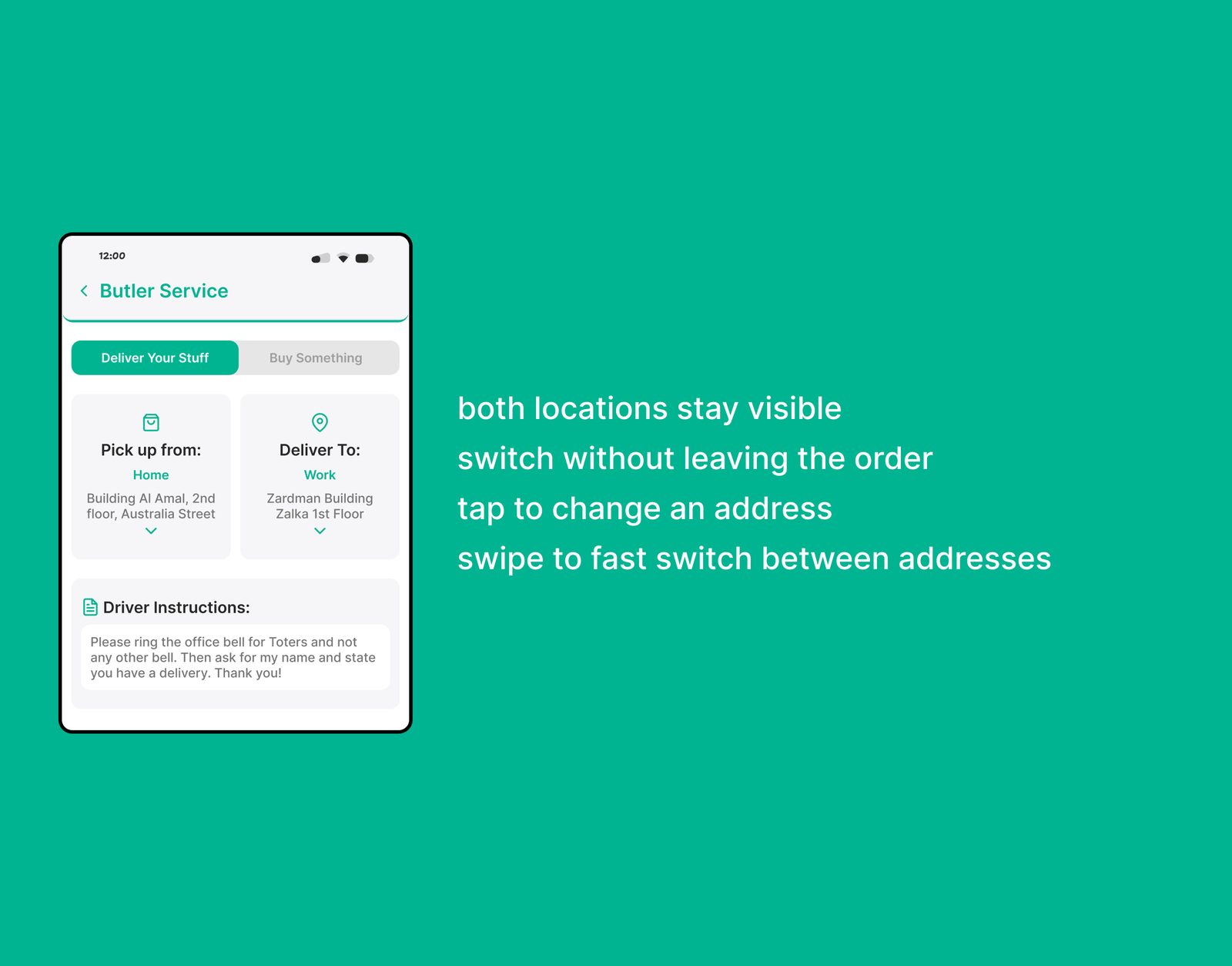
Pickup and delivery sit beside each other at the top, tap-to-edit, drag-to-swap. The win is fixing your route inside the order instead of backing out and starting over.
2. Adding information without adding steps
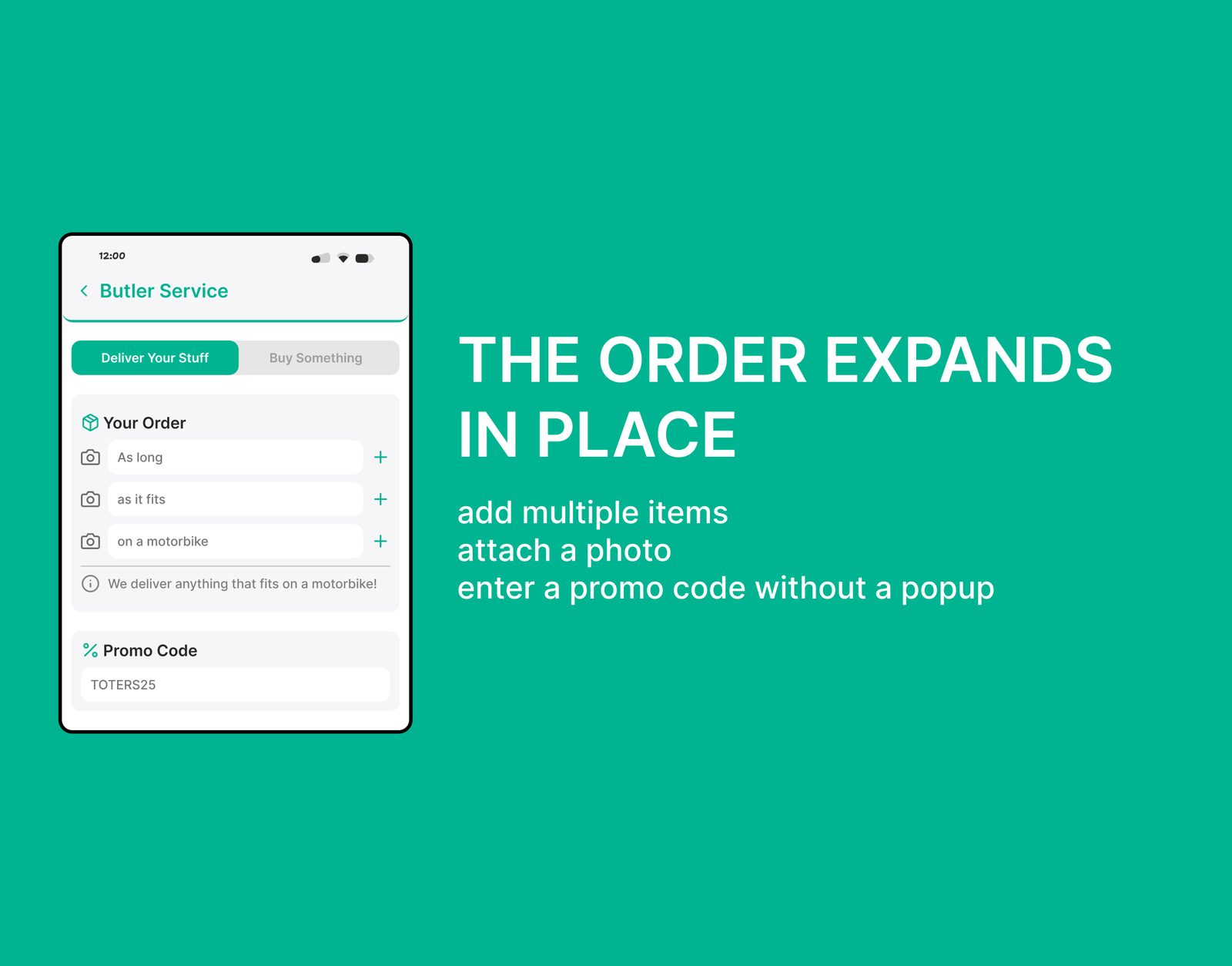
Multiple items and photo attachments live directly on the page, a plus control grows the request without opening another screen.
3. Making cost and availability visible
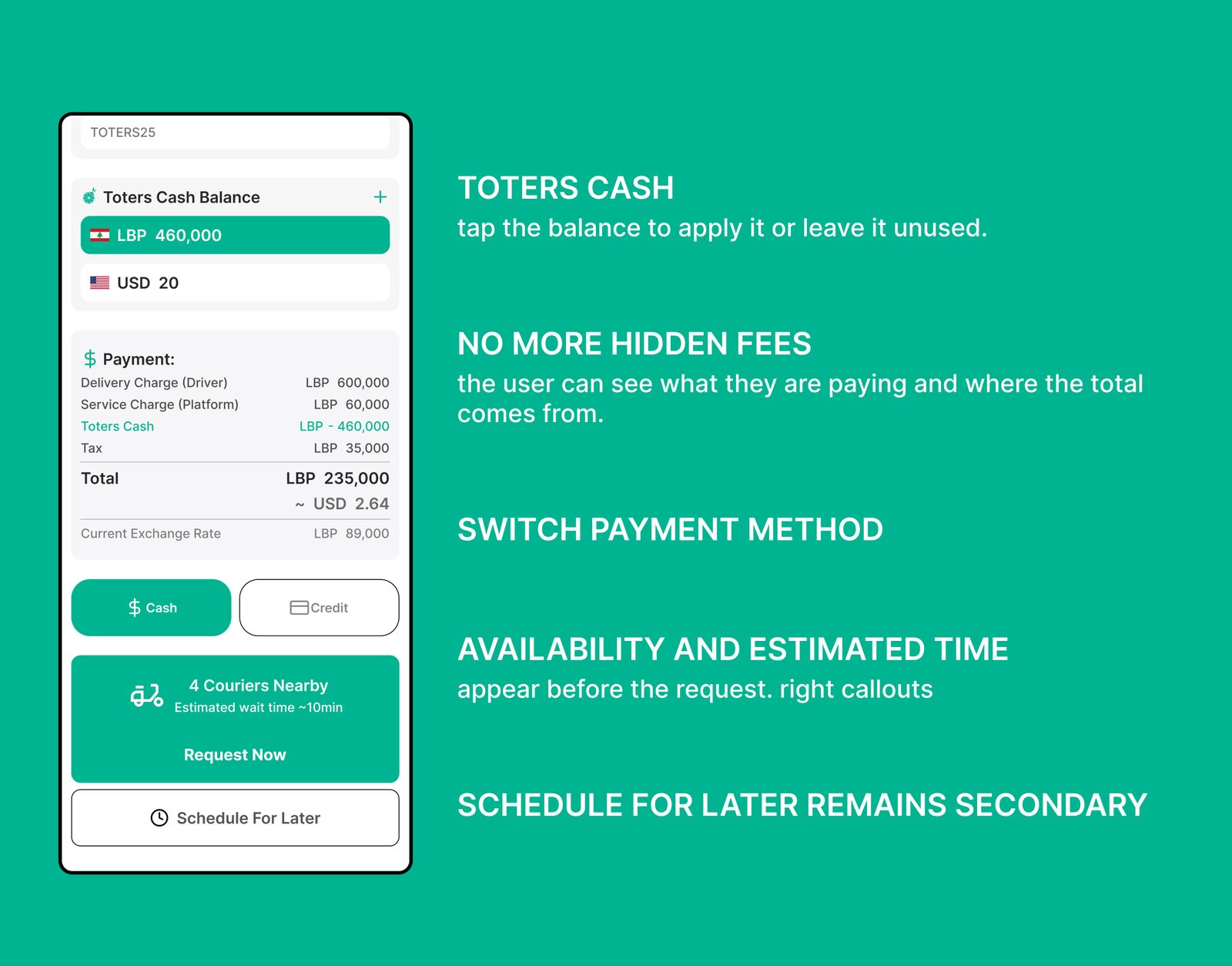
One payment view brings together Toters Cash in both currencies, the fee breakdown, nearby courier availability, and the expected wait.
The most important trust improvement: users decide with the cost and the expected wait in front of them, not after discovering them later.
4. Removing pressure from confirmation
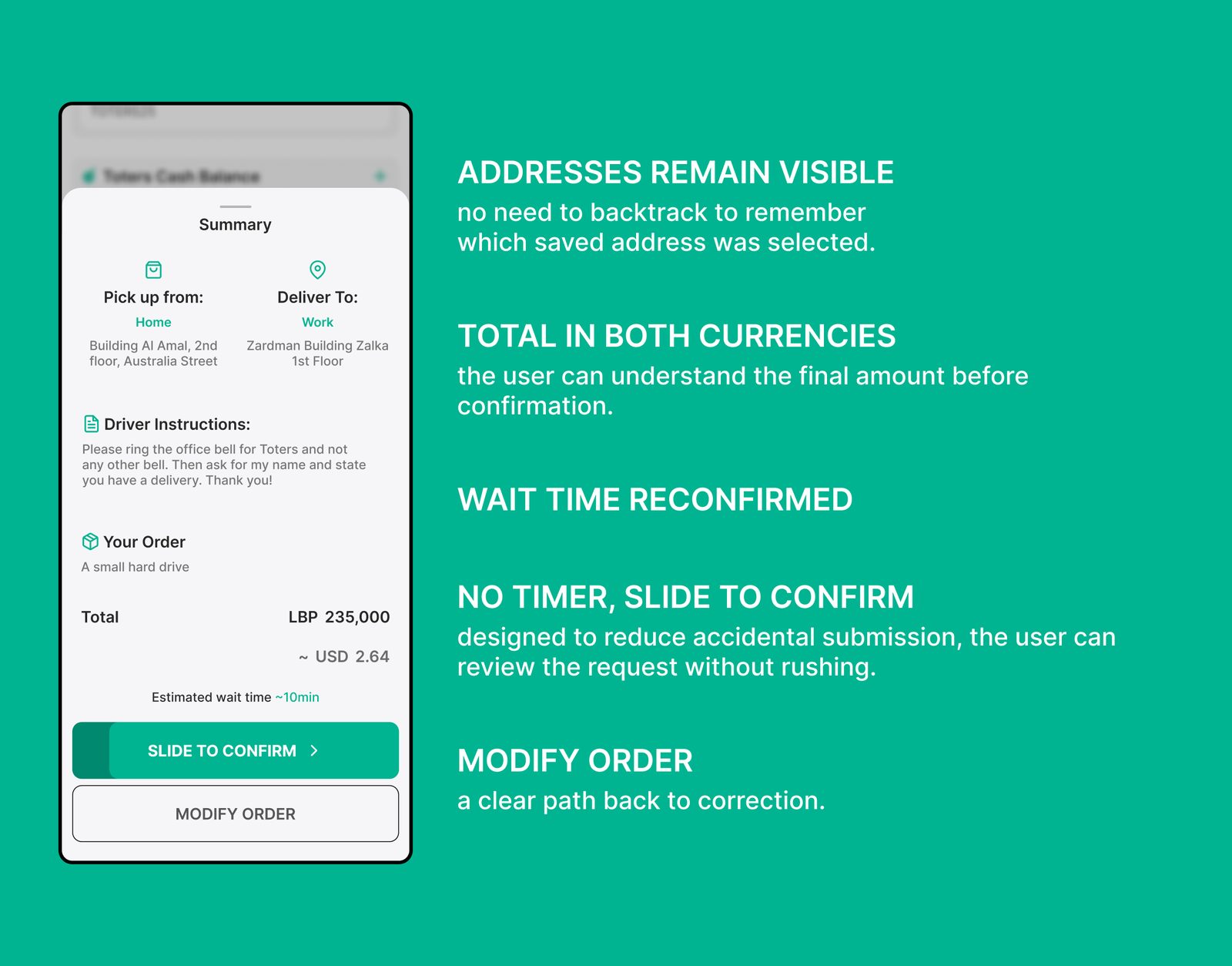
The final summary shows the full request, addresses, instructions, items, totals, estimated wait, with a way to modify it. It confirms what the user already saw, nothing new is discovered here.
05, The decisions, and why
Every interaction choice traces back to the walkthrough timings or the review findings:
- One continuous page, The old flow lost its seconds to screen changes, not fields. Estimated 4–6s saved, a hypothesis, never tested.
- Tap to edit, drag to swap, Tapping is familiar to everyone; the swap gesture rewards discovery without hiding the basic path.
- Slide to confirm, Gives the user control over the moment of submission and cuts accidental taps.
- Review timer removed, Confirmation shouldn’t be pressured, the summary is a place to check the request, not race it.
- “Request Now” is primary, Requesting a Butler is the point. Scheduling stays available, but secondary.
- Courier info before submitting, The loudest review complaint was long waits for courier acceptance. Seeing nearby couriers up front informs the choice.
06, What changed
- The request was divided across multiple screens → One scrollable, editable order
- Corrections required backward navigation → Key details change in place
- Price and payment appeared later → Totals and fees visible before submission
- Courier availability was uncertain → Nearby couriers and expected wait shown up front
07, What a real engagement would have added
- User testing and success metrics
- Improved WCAG compliance
- A simplified “Buy Something” flow
- Embedded real-time support
- Further product development
08, What three days taught me
Design for where the design will be deployed. Butler in Lebanon means anything that fits on a motorbike, addresses by building color and floor count, totals in two currencies. Those constraints aren’t an inconvenience, they’re the spec.
I also now timebox research to one artifact I can actually finish, and I learned to say what wasn’t measured up front, it turned out to be the most trusted line in the deck.
09, Closing
Butler’s value came from its openness: users could request almost anything. The redesign preserved that flexibility while giving the request a clearer structure, visible, editable and understandable from the first address to the final confirmation.
Butler can still do everything it could before. It’s just far easier to tell it what you need.













COMMENTS (2)
Lazyleaf
“Naram is an awesome designer that has helped us deliver a multitude of projects for our clients (website design, graphics & product design). I enjoy his hands-on approach, the consulting that comes along with his services, and the accountability demonstrated throughout our collaboration.”
Goodwood Tree
“Naram is an excellent web designer, who excelled in delivering a quality product in an efficient and effective manner. He was specific in understanding my goals, and also kind enough to explain some of the finer points of web design. His prices were reasonable for the top-notch work he performs, and I’d 10/10 recommend him for any web design needs you may have!”